
Rezona: Make Memeplays
Stratava GroupEntertainment
4.6544.00 Reviews
- Version
- 1.96.0
- Installs
- 10.00M
- Age Rating
- Teen
Screenshots
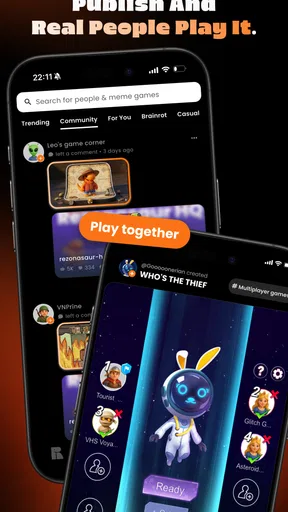

Our Review of Rezona: Make Memeplays
 Analysis by Appyee
I went into Rezona: Make Memeplays expecting a quick entertainment app for people who spend a lot of time online, and that is still the clearest way to understand it. It sits in the entertainment category, comes from Stratava Group, and is free to install, with optional purchases that can range from about one dollar to nearly five hundred dollars per item. The basic appeal is easy to grasp: it is built around the culture of memes and online reactions rather than around a traditional social network, video library, or serious editing suite.
That focus makes it interesting, but it also creates a particular kind of friction. An app aimed at fast, playful creation has to feel obvious within the first few minutes. If a control, template, or sharing step is unclear, the whole experience can feel slower than simply using the usual tools already on a phone. My overall impression is that Rezona is most appealing when you want to turn an online joke into something more personal, while it is less convincing if you only want to browse content or make polished videos.
What the first session feels like
The first thing I would tell a friend is not to judge the app by its store summary alone. “For the chronically online” captures the attitude, but it does not explain how much the experience depends on your own expectations. Someone who already understands meme formats will probably feel at home quickly. Someone looking for a conventional editor may wonder why the app is organized around internet humor instead of a clean timeline and a predictable export process.
The short description is simply “Rezona,” so the practical question is what kind of task you want to complete. If your goal is to make a playful reaction, remix a familiar idea, or prepare something to send to friends, the concept makes sense. If you want detailed control over layers, audio mixing, transitions, or professional output, I would start with a dedicated editing app instead. Rezona’s identity is its advantage, but that same identity narrows its audience.
The app is marked for Teen users, which is worth keeping in mind before handing it to a younger child or assuming every piece of internet humor will be suitable for a family setting. That rating does not tell me how every individual creation will feel, so I would still use ordinary judgment when sharing or browsing anything made through a meme-focused platform.
Where people are most likely to get stuck
The most common difficulty with an app like this is not necessarily a broken function. It is the gap between knowing what you want to make and understanding the app’s preferred starting point. A first-time user may open it with a finished joke in mind, then hesitate because the next step is not obvious. My advice is to begin with a very small experiment rather than trying to create the perfect post immediately.
Make one simple piece, check how the editing flow behaves, and only then spend time refining the idea. This is a useful habit because it separates creative decisions from setup problems. If the first attempt fails, you will know whether the issue came from your source material, the editing sequence, or the final sharing step.
Another point of friction is expectation management. Rezona should not be treated as a replacement for every tool used by online creators. A meme-making app can be quicker than a general editor when the idea is simple, but it can feel restrictive when you need precise placement or a highly specific visual result. I found that the best results come from adapting the joke to the app’s flow instead of forcing a complicated project into it.
Setup checks that save time
Before blaming the app, I would make a few basic checks. Confirm that the device is running at least Android 7.0, since that is the minimum operating system listed for the current Android release. Also make sure there is enough free storage for the source material and any temporary files created while working. A phone that is nearly full can make creative apps feel unreliable even when the app itself is functioning normally.
I would also test the simplest possible source before importing a large collection of images or clips. Use one item, complete a short edit, and see whether the preview and final step behave as expected. This approach is especially helpful on an older phone, where a large project may place more strain on the device than a small test does.
There is a practical reason to check the store version as well. The current version is 1.96.0, and keeping an app current can matter when a problem is caused by an older installation rather than by the general design. If an update is available, install it before rebuilding a project from scratch. I would also close other demanding apps and restart the phone if the interface becomes unusually slow.
For purchases, I would be careful rather than assuming that “free” means every option is included. Rezona is free to install, but in-app purchases are available, and individual items can cost from around one dollar to nearly five hundred dollars. That is a very wide range, so I would review each purchase screen closely, use device-level purchase protection, and avoid tapping through quickly when experimenting with unfamiliar options.
A workflow for recovering from a failed attempt
When a creation does not look right, the fastest recovery is usually to simplify the project. Remove the last change, preview again, and identify the exact point at which the result changed. If the app offers a back or undo action in the current workflow, use it before closing anything. If you restart immediately, it becomes harder to tell whether the problem was caused by one edit or by the whole project.
I also recommend keeping the original image or clip untouched in the phone’s normal gallery. Work from a copy whenever possible. That gives you a clean fallback if an edit becomes confusing, and it lets you try a different approach without losing the material you started with. This is a small habit, but it matters more in a playful app because users often experiment quickly and may not remember every change.
If the preview looks correct but the final result does not, repeat the process with a shorter or simpler source. That test helps distinguish a project-specific problem from a broader issue. If the smaller version works, rebuild the larger idea in stages. If even the simple version fails, restart the app, check the operating system and available storage, and try again before concluding that the project is lost.
Sharing problems deserve their own check. A successful creation inside Rezona does not guarantee that every outside service will accept it in exactly the same way. If sending directly does not work, save the result through the app’s available normal route first and then share it from the phone’s own gallery. That extra step is less elegant, but it can avoid confusing the app’s creation process with a problem in another service.
When the app is not the cause
Online entertainment apps are especially sensitive to conditions outside the app. A weak connection, an overloaded phone, restricted background activity, or a receiving service that is having trouble can all look like a Rezona failure. Before repeating the same action several times, I would switch between a stable Wi-Fi connection and mobile data if appropriate, then test a small project again.
It is also important to separate creative dissatisfaction from technical failure. If the result feels flat, that does not necessarily mean the app did something incorrectly. Meme-based work depends heavily on timing, source quality, and whether the joke is understandable without a long explanation. I found that a shorter idea with one clear visual point usually works better than adding several effects simply because they are available.
The same distinction applies to performance. A phone that handles messaging and browsing well may still struggle with media creation, especially when storage is low or many apps are open. Restarting the device, freeing space, and trying a smaller source are sensible first steps. I would only move to more disruptive measures after protecting any saved work and checking that the problem is repeatable.
There is a social limitation too. A meme that makes perfect sense to one group may feel dated, confusing, or too niche to another. Rezona can help you shape the presentation, but it cannot guarantee that the audience will understand the reference. For public sharing, I would view the result once without the original conversation around it. If the joke depends entirely on private context, it may be better as a message to friends than as a broad post.
How it compares with familiar alternatives
Compared with a general photo editor, Rezona is more focused on the language of online humor. That can reduce the time between having an idea and turning it into something shareable. The trade-off is that a general editor may offer more precise control and a broader range of finished styles. If your project includes careful typography, detailed compositing, or a polished brand look, the general editor is probably the better choice.
Compared with a full video editor, Rezona should be approached as a lighter, more immediate option. A full editor is preferable when you need a long sequence, careful audio work, or exact timing across many elements. Rezona makes more sense for a quick reaction or a compact joke that would lose its energy if you spent too long building it.
It is also different from simply browsing a social platform. A social app gives you a large stream of existing material and a built-in audience, while Rezona’s value is more personal: you are shaping something rather than only consuming it. That makes it a better fit for users who enjoy participating in internet culture, but a weaker fit for anyone who wants passive entertainment with no creative step.
Who will get the most from it
I would recommend Rezona to someone who regularly sends memes in group chats, enjoys remixing familiar online formats, and wants a low-pressure way to make a personal version. It is also useful for people who think visually but do not want to learn a complex editor just to create a quick joke. The free entry point makes it easy to test the basic experience before deciding whether optional purchases are worthwhile.
It is less suitable for a child who needs a tightly controlled creative environment, for a professional who requires dependable production tools, or for a user who dislikes experimenting with an app’s own style. I would also skip it if your main goal is simply to watch videos, because a creation-focused entertainment app is not the same thing as a conventional streaming service.
The audience size suggests that the concept has reached a substantial Android user base: Rezona has passed ten million installs and holds an average of 4.6 from around twenty-seven thousand ratings. Those figures make it easier to see why a curious user might try it, but they do not replace personal testing. A popular app can still be a poor match for someone who wants a different workflow.
My practical verdict after using it
Rezona works best when I treat it as a quick creative outlet rather than an all-purpose media tool. Its strongest quality is the way it speaks directly to people who understand meme culture and want to make something of their own. The weakest point is the possibility of friction when a user expects a conventional editor, a perfectly obvious workflow, or a result that requires detailed control.
My recommendation is to start with a small project, keep the original source safe, check the device and connection before troubleshooting, and be deliberate around optional purchases. Those steps make the experience less frustrating and help reveal whether the app fits your habits. If you enjoy making short, informal pieces for friends or online communities, it is worth trying. If you need professional precision or prefer only to consume entertainment, another category of app will serve you better.
Stratava Group has positioned this as an entertainment app with a very specific online personality, and that specificity is exactly why it can feel more engaging than a generic editor for the right person. I would not recommend installing it expecting every creative problem to disappear. I would recommend it as a playful, focused tool for turning a familiar internet idea into something that feels like yours.
Verdict
Strengths of Rezona: Make Memeplays
- Simple tools make meme creation quick for beginners.
- Supports short video edits suited to social media sharing.
- Memeplay concepts encourage creative use of popular formats.
- Lightweight editing workflow is easy to learn on mobile.
- Useful for turning everyday clips into humorous content.
Limitations of Rezona: Make Memeplays
- Template and media variety may feel limited compared with larger editors.
- Some features or assets may require in-app purchases.
- Export quality can vary depending on the selected format.
- Meme trends may become outdated quickly within the app.
- Sharing options may depend on other social apps being installed.
Similar Picks in This Category
View All
Google Play Games
Google LLC3.9

Netflix
Netflix, Inc.4.8

YouTube Kids
Google LLC4.2

Disney+
Disney4.4

Prime Video
Amazon Mobile LLC4.7

Steam
Valve Corporation3.2
Frequently Asked Questions
What is Rezona: Make Memeplays?
Rezona: Make Memeplays is a creative entertainment app focused on making short, humorous meme-style videos and edits. It is designed for users who want to combine images, clips, captions, sounds, and visual effects into shareable content without needing advanced video-editing skills. The app is best suited to casual creators, meme fans, and anyone looking for quick tools to produce funny social media posts.
Is Rezona: Make Memeplays free to download and use?
Rezona: Make Memeplays can generally be downloaded for free, but some features, templates, effects, or content may depend on the app’s current access model. Before creating a large project, users should check the listing for possible in-app purchases, subscriptions, advertising, or export restrictions. Availability of premium tools can also vary between Android and iOS, so reviewing the store details is recommended.
Do I need editing experience to create memeplays in Rezona?
No advanced editing experience is normally required to get started with Rezona: Make Memeplays. Its appeal comes from providing accessible creative tools, ready-to-use formats, and simple ways to add humorous text, media, and audio. Beginners can experiment with templates and basic controls first, while more experienced users may spend additional time adjusting timing, layers, effects, and presentation.
Can I share or save the memeplays created in Rezona?
The app is intended for creating content that can be saved or shared through common social platforms, although the exact export options may depend on the device, application version, and selected project elements. Some exports may include branding, reduced quality, or other limitations unless a particular feature is unlocked. Users should also check the permissions requested before granting access to photos, files, or media.
Is the content created with Rezona safe to publish online?
Rezona provides creative tools, but users remain responsible for the material they upload and publish. Avoid using copyrighted music, private images, personal information, or someone else’s likeness without permission. Meme content can also be misunderstood when shared publicly, so it is worth reviewing captions and edits before posting. Parents may want to supervise younger users because the app’s community or online sharing features can vary.
